
All requests to the Paddle API require authentication unless explicitly stated. The API uses Bearer authentication.
To authenticate, pass your Paddle API key using the Authorization header and the Bearer prefix. For example:
Authorization: Bearer pdl_live_apikey_01gtgztp8f4kek3yd4g1wrksa3_q6TGTJyvoIz7LDtXT65bX7_AQOTo test your authentication, follow the Quickstart.
Authentication methods
Paddle offers two kinds of authentication methods:
API keys
Used to interact with the Paddle API in your backend. For example, building subscription upgrade and downgrade workflows.
Intended only for server-side use.
May have full access to your data, depending on the permissions assigned to the API key.
Must be kept secure and secret and not published in your app code.
Client-side tokens
Used to work with Paddle.js in your frontend. For example, launching a checkout and previewing prices or transactions.
Intended only for client-side use.
Limited to opening checkouts, previewing prices, and previewing transactions.
Safe to publish in your app code.
This guide is about API keys. For information on client-side tokens, see Paddle.js.
Create an API key
Treat your API key like a password. Keep it safe and never share it with apps or people you don't trust.
- Go to Paddle > Developer Tools > Authentication.
- Click the API keys tab.
- Click New API key
- Enter a name for the API key. This should be a human-readable name that you can use to uniquely identify this key.
- Enter a description for the API key.
- Select the permissions for the API key. Choose only the permissions you need for your app or integration.
- Set the expiry date for the API key.
- Click Save when you're done.
- Copy your API key and store it securely.
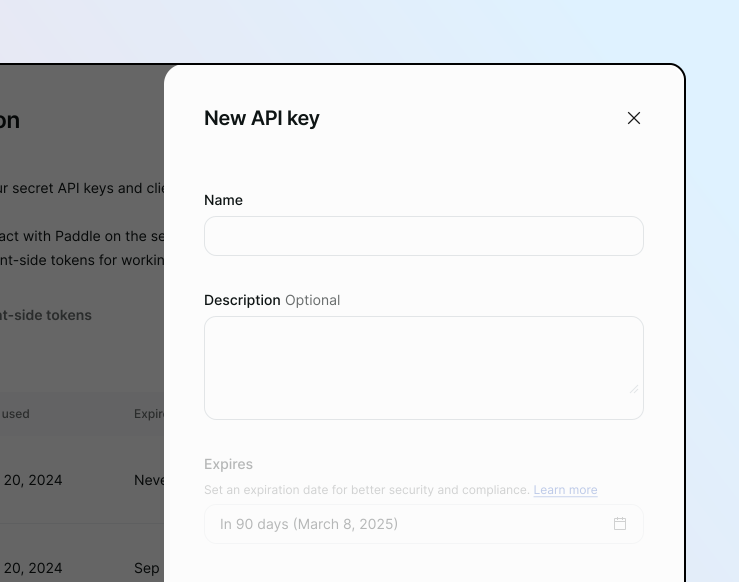
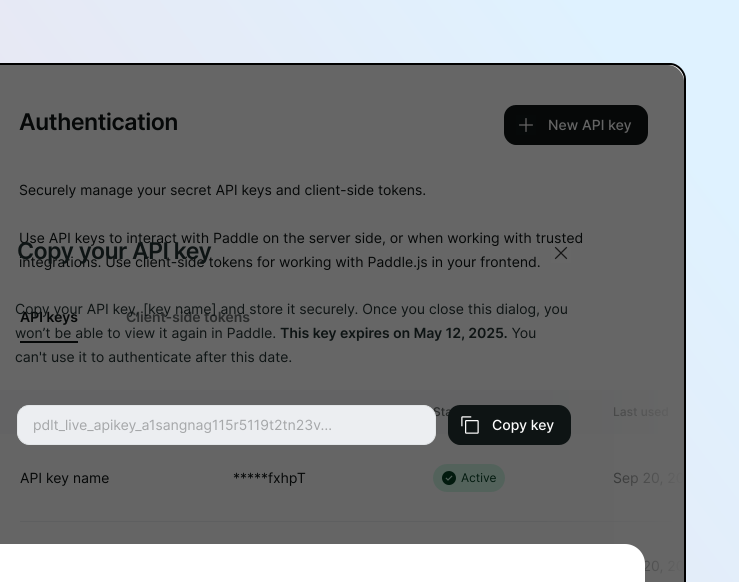
For security reasons, the API key is only visible once. If you lose it, you'll need to revoke it and create a new API key.
API key format
API keys look like this:
pdl_sdbx_apikey_01gtgztp8f4kek3yd4g1wrksa3_q6TGTJyvoIz7LDtXT65bX7_AQOpdl_live_apikey_01gtgztp8f4kek3yd4g1wrksa3_q6TGTJyvoIz7LDtXT65bX7_AQOEvery API key includes:
| Component | Used for |
|---|---|
pdl_ | Identifies this as a Paddle API key. |
live_ or sdbx_ | Identifies whether a key is for the live environment or sandbox environment. |
apikey_ | Differentiates the key from client-side tokens. |
| 26-char alphanumeric string | API key |
They're 69 characters in length and always contain five underscores. You can use regex to match API keys:
^pdl_(live|sdbx)_apikey_[a-z\d]{26}_[a-zA-Z\d]{22}_[a-zA-Z\d]{3}$API keys are case-sensitive.
Keys created before May 6, 2025 are considered legacy keys. They don't follow the same format as newer keys, and they don't support permissions or secret scanning.
Legacy keys are a random string of 50 characters. They contain only lowercase letters and numbers.
da3f01dbed7a549cf0d8eb454bf5fded90d021f9975eba5caeYou should revoke legacy API keys and replace with newer-style API keys as soon as you can.
Secret scanning
Paddle automatically monitors public repositories on GitHub to detect when API keys are accidentally committed. This helps protect your account from unauthorized access and potential security breaches.
When an API key is detected in a repository, Paddle notifies the account owner by email and takes appropriate action depending on the risk level:
| Level | Meaning | API key status |
|---|---|---|
| High | Exposed publicly, like in public GitHub repository. | Automatically revoked to protect your account. |
| Low | Already expired or revoked. | Already inactive. |
When an API key is exposed, you should:
- Replace the key
Create a new API key in the dashboard and update all applications or services that use the revoked key. - Investigate the exposure
Review the source of the leak to understand how it happened and prevent future exposures. - Audit for malicious activity
Review your logs for any unauthorized calls made by this key before its revocation.
While low-risk exposure notifications are purely informational, you should investigate how an inactive key was exposed to prevent it from happening again.
You can optionally subscribe to webhook notifications for API key exposure events.
| Webhook | Description |
|---|---|
api_key_exposure.created | Occurs when an exposure is detected. |
api_key.revoked | Occurs when a key is automatically revoked. |
All exposures are tracked and visible in the dashboard for transparency and security auditing.
Expiration
You don't have to set an expiry date for your API keys, but we strongly recommend you do to protect your account from unauthorized access.
When you create an API key, you can set an expiry date for it. This is the date when the API key is no longer valid. Expiry dates are useful to limit the lifetime of a key and reduce the risk of exposure.
The default expiry date is 90 days from the date of creation and can't be more than one year from the date of creation.
Once a key has expired, it's no longer valid and can't be used to access the Paddle API. Expired keys can't be revalidated. Create a new API key to rotate.
You can subscribe to webhook notifications for API key expiration events:
| Webhook | Description |
|---|---|
api_key.expiring | Occurs when an API key expires in seven days. |
api_key.expired | Occurs when an API key has expired. |
Permissions
You can determine what a key can and can't do by assigning permissions to it.
We recommend creating a key with the minimum permissions required for your app or integration to function. This reduces the risk of accidental misuse or exposure. Create multiple keys with different permissions for different apps or integrations.
Requests made with API keys that don't have the required permissions return a forbidden error (403).
Best practices
Your API key is a sensitive security credential. It grants access to your Paddle data and can be used to make changes to your account. If bad actors gain access to your API key, it can harm your business.
The Paddle API returns an Access-Control-Allow-Origin header that blocks direct access from browsers, so calls must be made from your backend.
You and your team are responsible for storing your API keys safely. Follow these best practices to help protect your API keys:
Always
- Set an expiry date for your API keys.
- Rotate your API keys regularly.
- Use environment variables or credential management systems to store your API key.
Never
- Share your API key in emails or chat.
- Hardcode your API key in your code.
- Include API keys in client-side code.
- Store your API key in a public or accessible location.