
A notification destination is a webhook endpoint or email address that Paddle sends notifications about events to. It's called a notification setting in the API.
Use an AI agent
Create a notification destination
Create a notification destination to start receiving notifications for events. You can choose the kind of events that you want to receive notifications for.
You can create as many notification destinations as you want, but only 10 can be active at once.
- Go to Paddle > Developer tools > Notifications.
- Click New destination
- Enter the details for your new notification destination.
- Choose the events that you want to receive notifications for.
- Click Save destination when you're done.
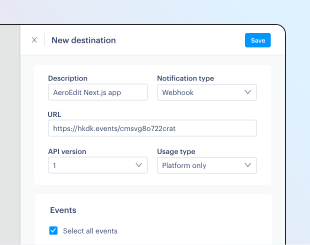
- Description
-
Short description for this notification destination.
- Notification type
-
Whether you want to send events to a webhook endpoint or an email address.
- URL or email
-
Webhook endpoint URL or email address to send events to.
- API version
-
API version that entities for events should conform to.
- Usage type
-
Whether this destination receives real platform events, simulation events, or both.
Create a notification destination using the API in two steps:
- List event types and extract names
Query the API to learn about the events that you can subscribe to, then extract names. - Create your destination
Build a request that includes details of your destination and an array of strings for the events you want to receive, then send your request.
List event types and extract names Optional
Event types are actions that Paddle creates events for. To create a notification destination, you'll need to tell Paddle which event types you want to get notifications for.
Send a GET request to the /event-types endpoint to get a list of all event types. Review the response, then extract data[].name for the events that you want to subscribe to and save these for later — we'll use this in the next step.
{ "data": [ { "name": "transaction.billed", "description": "Occurs when a transaction is billed. Its status field changes to billed and billed_at is populated.", "group": "Transaction", "available_versions": [1] }, { "name": "transaction.canceled", "description": "Occurs when a transaction is canceled. Its status field changes to canceled.", "group": "Transaction", "available_versions": [1] }, { "name": "transaction.completed", "description": "Occurs when a transaction is completed. Its status field changes to completed.", "group": "Transaction", "available_versions": [1] }, { "name": "transaction.created", "description": "Occurs when a transaction is created.", "group": "Transaction", "available_versions": [1] }, { "name": "transaction.paid", "description": "Occurs when a transaction is paid. Its status field changes to paid.", "group": "Transaction", "available_versions": [1] }, { "name": "transaction.past_due", "description": "Occurs when a transaction becomes past due. Its status field changes to past_due.", "group": "Transaction", "available_versions": [1] }, { "name": "transaction.payment_failed", "description": "Occurs when a payment fails for a transaction. The payments array is updated with details of the payment attempt.", "group": "Transaction", "available_versions": [1] }, { "name": "transaction.ready", "description": "Occurs when a transaction is ready to be billed. Its status field changes to ready.", "group": "Transaction", "available_versions": [1] }, { "name": "transaction.updated", "description": "Occurs when a transaction is updated.", "group": "Transaction", "available_versions": [1] }, { "name": "subscription.activated", "description": "Occurs when a subscription becomes active. Its status field changes to active. This means any trial period has elapsed and Paddle has successfully billed the customer.", "group": "Subscription", "available_versions": [1] }, { "name": "subscription.canceled", "description": "Occurs when a subscription is canceled. Its status field changes to canceled.", "group": "Subscription", "available_versions": [1] }, { "name": "subscription.created", "description": "Occurs when a subscription is created. subscription.trialing or subscription.activated typically follow.", "group": "Subscription", "available_versions": [1] }, { "name": "subscription.imported", "description": "Occurs when a subscription is imported.", "group": "Subscription", "available_versions": [1] }, { "name": "subscription.past_due", "description": "Occurs when a subscription has an unpaid transaction. Its status changes to past_due.", "group": "Subscription", "available_versions": [1] }, { "name": "subscription.paused", "description": "Occurs when a subscription is paused. Its status field changes to paused.", "group": "Subscription", "available_versions": [1] }, { "name": "subscription.resumed", "description": "Occurs when a subscription is resumed after being paused. Its status field changes to active.", "group": "Subscription", "available_versions": [1] }, { "name": "subscription.trialing", "description": "Occurs when a subscription enters trial period.", "group": "Subscription", "available_versions": [1] }, { "name": "subscription.updated", "description": "Occurs when a subscription is updated.", "group": "Subscription", "available_versions": [1] }, { "name": "product.created", "description": "Occurs when a product is created.", "group": "Product", "available_versions": [1] }, { "name": "product.imported", "description": "Occurs when a product is imported.", "group": "Product", "available_versions": [1] }, { "name": "product.updated", "description": "Occurs when a product is updated.", "group": "Product", "available_versions": [1] }, { "name": "price.created", "description": "Occurs when a price is created.", "group": "Price", "available_versions": [1] }, { "name": "price.imported", "description": "Occurs when a price is imported.", "group": "Price", "available_versions": [1] }, { "name": "price.updated", "description": "Occurs when a price is updated.", "group": "Price", "available_versions": [1] }, { "name": "customer.created", "description": "Occurs when a customer is created.", "group": "Customer", "available_versions": [1] }, { "name": "customer.imported", "description": "Occurs when a customer is imported.", "group": "Customer", "available_versions": [1] }, { "name": "customer.updated", "description": "Occurs when a customer is updated.", "group": "Customer", "available_versions": [1] }, { "name": "address.created", "description": "Occurs when an address is created.", "group": "Address", "available_versions": [1] }, { "name": "address.imported", "description": "Occurs when a address is imported.", "group": "Address", "available_versions": [1] }, { "name": "address.updated", "description": "Occurs when an address is updated.", "group": "Address", "available_versions": [1] }, { "name": "business.created", "description": "Occurs when a business is created.", "group": "Business", "available_versions": [1] }, { "name": "business.imported", "description": "Occurs when a business is imported.", "group": "Business", "available_versions": [1] }, { "name": "business.updated", "description": "Occurs when a business is updated.", "group": "Business", "available_versions": [1] }, { "name": "adjustment.created", "description": "Occurs when an adjustment is created.", "group": "Adjustment", "available_versions": [1] }, { "name": "adjustment.updated", "description": "Occurs when an adjustment is updated, the only time an adjustment will be updated is when the status changes from pending to approved or from pending to rejected.", "group": "Adjustment", "available_versions": [1] }, { "name": "payout.created", "description": "Occurs when a payout is created.", "group": "Payout", "available_versions": [1] }, { "name": "payout.paid", "description": "Occurs when a payout is paid.", "group": "Payout", "available_versions": [1] }, { "name": "discount.created", "description": "Occurs when a discount is created.", "group": "Discount", "available_versions": [1] }, { "name": "discount.imported", "description": "Occurs when a discount is imported.", "group": "Discount", "available_versions": [1] }, { "name": "discount.updated", "description": "Occurs when a discount is updated.", "group": "Discount", "available_versions": [1] }, { "name": "report.created", "description": "Occurs when a report is created.", "group": "Report", "available_versions": [1] }, { "name": "report.updated", "description": "Occurs when a report is updated.", "group": "Report", "available_versions": [1] } ], "meta": { "request_id": "364194bd-2f30-4cfb-8190-ce5a774efa0a" }}Create your destination
Build a request that includes information about your destination.
- The value for
destinationchanges depending on thetype. Foremail, pass a valid email address. Forurl, pass a valid URL. - Pass an array of strings as
eventsfor the events you want to receive notifications for. - Pass
traffic_sourceto determine whether this destination receives real platform events, simulation events, or both.
Send a POST request to the /notification-settings endpoint with the request you built. If successful, Paddle responds with a copy of the new notification destination.
The response includes an object for each subscribed event with details about that event, and an endpoint_secret_key that you can use to verify events come from Paddle.
Treat your endpoint secret key like a password. Keep it safe and never share it with apps or people you don't trust.
{ "description": "Slack notifications", "type": "url", "destination": "https://hooks.slack.com/example", "api_version": 1, "traffic_source": "all", "subscribed_events": [ "transaction.billed", "transaction.canceled", "transaction.completed", "transaction.created", "transaction.payment_failed", "transaction.ready", "transaction.updated", "subscription.activated", "subscription.created", "subscription.past_due", "subscription.paused", "subscription.resumed", "subscription.trialing", "subscription.updated" ]}{ "data": { "id": "ntfset_01gkpjp8bkm3tm53kdgkx6sms7", "description": "Slack notifications", "type": "url", "destination": "https://hooks.slack.com/example", "active": true, "api_version": 1, "include_sensitive_fields": false, "traffic_source": "all", "subscribed_events": [ { "name": "transaction.billed", "description": "Occurs when a transaction is billed.", "group": "Transaction", "available_versions": [1] }, { "name": "transaction.canceled", "description": "Occurs when a transaction is canceled.", "group": "Transaction", "available_versions": [1] }, { "name": "transaction.completed", "description": "Occurs when a transaction is completed.", "group": "Transaction", "available_versions": [1] }, { "name": "transaction.created", "description": "Occurs when a transaction is created.", "group": "Transaction", "available_versions": [1] }, { "name": "transaction.payment_failed", "description": "Occurs when a payment fails for a transaction.", "group": "Transaction", "available_versions": [1] }, { "name": "transaction.ready", "description": "Occurs when a transaction is ready.", "group": "Transaction", "available_versions": [1] }, { "name": "transaction.updated", "description": "Occurs when a transaction is updated.", "group": "Transaction", "available_versions": [1] }, { "name": "subscription.activated", "description": "Occurs when a subscription is activated.", "group": "Subscription", "available_versions": [1] }, { "name": "subscription.canceled", "description": "Occurs when a subscription is canceled.", "group": "Subscription", "available_versions": [1] }, { "name": "subscription.created", "description": "Occurs when a subscription is created.", "group": "Subscription", "available_versions": [1] }, { "name": "subscription.past_due", "description": "Occurs when a subscription is past due.", "group": "Subscription", "available_versions": [1] }, { "name": "subscription.paused", "description": "Occurs when a subscription is paused.", "group": "Subscription", "available_versions": [1] }, { "name": "subscription.resumed", "description": "Occurs when a subscription is resumed.", "group": "Subscription", "available_versions": [1] }, { "name": "subscription.trialing", "description": "Occurs when a subscription is trialing.", "group": "Subscription", "available_versions": [1] }, { "name": "subscription.updated", "description": "Occurs when a subscription is updated.", "group": "Subscription", "available_versions": [1] } ], "endpoint_secret_key": "pdl_ntfset_01gkpjp8bkm3tm53kdgkx6sms7_6h3qd3uFSi9YCD3OLYAShQI90XTI5vEI" }, "meta": { "request_id": "fd55d51a-6242-4645-8572-af2a8b6f41b6" }}Update a notification destination
Once you've created a notification destination, you can change its description, destination URL or email, what kind of traffic it receives, and the events it's subscribed to.
- Go to Paddle > Developer tools > Notifications.
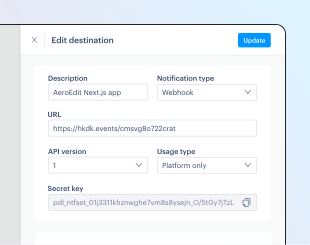
- Click the button next to a notification destination in the list, then choose Edit destination from the menu.
- Edit notification destination details and subscribed events.
- Click Update destination when you're done.
Send a PATCH request to the /notification-settings/{notification_setting_id} endpoint, passing the ID of the notification destination as a path parameter. Include only the fields you want to update. Omitted fields remain unchanged.
If successful, Paddle responds with a copy of the updated notification destination.
{ "description": "Slack notifications (old)", "active": false}{ "data": { "id": "ntfset_01gkpjp8bkm3tm53kdgkx6sms7", "description": "Slack notifications (old)", "type": "url", "destination": "https://hooks.slack.com/example", "active": false, "api_version": 1, "include_sensitive_fields": false, "traffic_source": "all", "subscribed_events": [ { "name": "transaction.billed", "description": "Occurs when a transaction is billed.", "group": "Transaction", "available_versions": [1] }, { "name": "transaction.canceled", "description": "Occurs when a transaction is canceled.", "group": "Transaction", "available_versions": [1] }, { "name": "transaction.completed", "description": "Occurs when a transaction is completed.", "group": "Transaction", "available_versions": [1] }, { "name": "transaction.created", "description": "Occurs when a transaction is created.", "group": "Transaction", "available_versions": [1] }, { "name": "transaction.payment_failed", "description": "Occurs when a payment fails for a transaction.", "group": "Transaction", "available_versions": [1] }, { "name": "transaction.ready", "description": "Occurs when a transaction is ready.", "group": "Transaction", "available_versions": [1] }, { "name": "transaction.updated", "description": "Occurs when a transaction is updated.", "group": "Transaction", "available_versions": [1] }, { "name": "subscription.activated", "description": "Occurs when a subscription is activated.", "group": "Subscription", "available_versions": [1] }, { "name": "subscription.canceled", "description": "Occurs when a subscription is canceled.", "group": "Subscription", "available_versions": [1] }, { "name": "subscription.created", "description": "Occurs when a subscription is created.", "group": "Subscription", "available_versions": [1] }, { "name": "subscription.past_due", "description": "Occurs when a subscription is past due.", "group": "Subscription", "available_versions": [1] }, { "name": "subscription.paused", "description": "Occurs when a subscription is paused.", "group": "Subscription", "available_versions": [1] }, { "name": "subscription.resumed", "description": "Occurs when a subscription is resumed.", "group": "Subscription", "available_versions": [1] }, { "name": "subscription.trialing", "description": "Occurs when a subscription is trialing.", "group": "Subscription", "available_versions": [1] }, { "name": "subscription.updated", "description": "Occurs when a subscription is updated.", "group": "Subscription", "available_versions": [1] } ], "endpoint_secret_key": "pdl_ntfset_01gkpjp8bkm3tm53kdgkx6sms7_6h3qd3uFSi9YCD3OLYAShQI90XTI5vEI" }, "meta": { "request_id": "be464f91-8050-49df-a351-994b25da3714" }}Deactivate a notification destination
Deactivate a notification destination to stop Paddle from sending notifications for events to it. Deactivation is useful if you need to make changes to a webhook endpoint server or integration. You can reactivate later, if needed.
- Go to Paddle > Developer tools > Notifications.
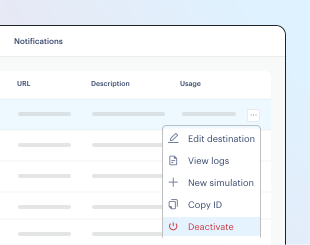
- Click the button next to a notification destination in the list, then choose Deactivate from the menu.
- Click Deactivate destination on the confirmation dialog.
You can reactivate later by choosing Activate from the menu.
Send a PATCH request to the /notification-settings/{notification_setting_id} endpoint, setting active to false.
If successful, Paddle responds with a copy of the updated notification destination. Paddle no longer tries to deliver notifications for subscribed events.
{ "description": "Slack notifications (old)", "active": false}{ "data": { "id": "ntfset_01gkpjp8bkm3tm53kdgkx6sms7", "description": "Slack notifications (old)", "type": "url", "destination": "https://hooks.slack.com/example", "active": false, "api_version": 1, "include_sensitive_fields": false, "traffic_source": "platform", "subscribed_events": [ { "name": "transaction.billed", "description": "Occurs when a transaction is billed.", "group": "Transaction", "available_versions": [1] }, { "name": "transaction.canceled", "description": "Occurs when a transaction is canceled.", "group": "Transaction", "available_versions": [1] }, { "name": "transaction.completed", "description": "Occurs when a transaction is completed.", "group": "Transaction", "available_versions": [1] }, { "name": "transaction.created", "description": "Occurs when a transaction is created.", "group": "Transaction", "available_versions": [1] }, { "name": "transaction.payment_failed", "description": "Occurs when a payment fails for a transaction.", "group": "Transaction", "available_versions": [1] }, { "name": "transaction.ready", "description": "Occurs when a transaction is ready.", "group": "Transaction", "available_versions": [1] }, { "name": "transaction.updated", "description": "Occurs when a transaction is updated.", "group": "Transaction", "available_versions": [1] }, { "name": "subscription.activated", "description": "Occurs when a subscription is activated.", "group": "Subscription", "available_versions": [1] }, { "name": "subscription.canceled", "description": "Occurs when a subscription is canceled.", "group": "Subscription", "available_versions": [1] }, { "name": "subscription.created", "description": "Occurs when a subscription is created.", "group": "Subscription", "available_versions": [1] }, { "name": "subscription.past_due", "description": "Occurs when a subscription is past due.", "group": "Subscription", "available_versions": [1] }, { "name": "subscription.paused", "description": "Occurs when a subscription is paused.", "group": "Subscription", "available_versions": [1] }, { "name": "subscription.resumed", "description": "Occurs when a subscription is resumed.", "group": "Subscription", "available_versions": [1] }, { "name": "subscription.trialing", "description": "Occurs when a subscription is trialing.", "group": "Subscription", "available_versions": [1] }, { "name": "subscription.updated", "description": "Occurs when a subscription is updated.", "group": "Subscription", "available_versions": [1] } ], "endpoint_secret_key": "pdl_ntfset_01gkpjp8bkm3tm53kdgkx6sms7_6h3qd3uFSi9YCD3OLYAShQI90XTI5vEI" }, "meta": { "request_id": "df1f7d45-5d2b-4fcd-9a7d-2122145547b4" }}Delete a notification destination
There's no way to recover a deleted notification destination. Deactivate a notification destination if you'll need access to the logs or want to reactivate later.
Delete a notification destination to permanently remove it from your Paddle account. Paddle stops sending notifications for events to your destination and you lose access to all delivery logs for it.
You can only delete notification destinations using the API.
Send a DELETE request to the /notification-settings/{notification_setting_id} endpoint, passing the ID of the notification destination as a path parameter. If successful, Paddle returns 204 No Content with no response body.
/notification-settings/{notification_setting_id} Unique Paddle ID for this notification, prefixed with ntfset_.
Troubleshooting
If you're having trouble creating, updating, or activating a notification destination, check that:
- The webhook endpoint URL or email address you're using is correctly formatted.
- You've not exceeded the limit for active notifications. You can have up to 10 active notification destinations. Deactivate a notification destination before creating a new one.
- You set the correct notification type. Simulated events can only be delivered to webhook destinations and can't be delivered to email destinations. Change the Notification type to URL or the Usage type to Platform only in the dashboard, or change
typetourlortraffic_sourcetoplatformin the API request.
If you're not receiving either type of notification:
- Check that you subscribed to the events you're expecting to receive. You'll only receive notifications for events that you checked when configuring the notification destination. This includes simulated events, too. Simulated events can't be sent to email destinations.
- Check that you entered the correct email address or webhook endpoint URL.
If you're not receiving webhook notifications:
- Review your webhook logs to see if there are any delivery errors or timeout issues. Go to Paddle > Developer tools > Notifications, click the button next to a destination in the list, then choose View logs to review.
- Make sure the endpoint is accessible and responding with
2xxstatus codes.
Common errors
notification_maximum_active_settings_reached |
| You tried to add a new active notification setting but already have 10 active settings. |
url_notification_setting_incorrect |
| You're attempting to change a URL Notification Setting destination to something other than a URL. |
email_notification_setting_incorrect |
| You're attempting to change an email Notification Setting destination to something other than an email. |