
As a customer moves through the checkout, Paddle.js emits events for key actions like:
- When the checkout is opened, closed, or completed
- When customer information is added, updated, or removed
- When items are added, removed, or updated
- When payments are attempted and outcomes of payment attempts
- When discounts are added or removed
- When an upsell is skipped
You can pass an eventCallback when initializing Paddle.js to run actions based on these events. It's typically used to show and update on-page information when building an inline checkout.
Event schema
Most transaction-related events include the same basic schema, with a payload that closely mirrors transactions in the Paddle API.
checkout.warning and checkout.error events don't follow this schema. Payloads closely mirror error responses in the Paddle API instead.
New events added to the platform may not follow these schemas, so you should build your event handler to handle unexpected fields or values. Use event.name to listen only to the events you need.
Common attributes
When building an inline checkout, you can use events to present totals and other information about a customer's purchase.
It's important that customers know who they're buying from, what they're buying, and how much they're paying.
To build an inline checkout that's compliant and optimized for conversion, your implementation must include:
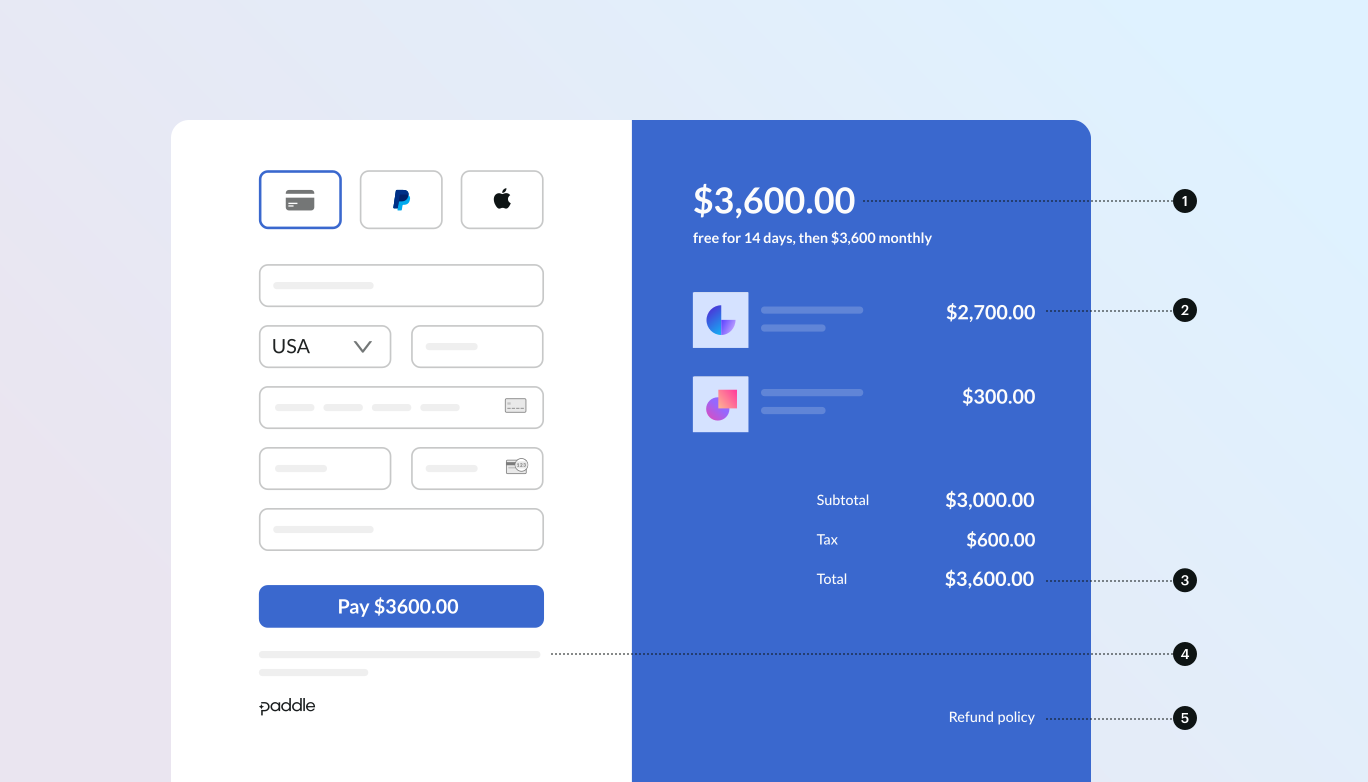
- If recurring, how often it recurs and the total to pay on renewal. If a trial, how long the trial lasts.
- A description of what's being purchased.
- Transaction totals, including subtotal, total tax, and grand total. Be sure to include the currency too.
- The full inline checkout frame, including the checkout footer that has information about Paddle, our terms of sale, and our privacy policy.
- A link to your refund policy, if it differs from the Paddle.com standard refund policy.
Here are some commonly used fields in Paddle.js events that you might like to use in your implementation:
| Event | Used for |
|---|---|
data.items[].product.name | Product name for itemized breakdowns. |
data.items[].price_name | Price name. Typically describes how often this item bills. |
data.items[].trial_period | Details about the trial period for an item, if any. |
data.items[].billing_cycle | How often an item is billed, if recurring. |
data.items[].totals.subtotal | Total for an item, excluding tax and discount. |
data.totals.total | Grand total for a transaction, including tax and discount. |
data.recurring_totals.total | Recurring total for a transaction, including tax and discount. |
(data.totals.total - data.recurring_totals.total) | Where transactions contain a mix of one-time charges and recurring items, subtract a value in data.recurring_totals from the corresponding value in data.totals to calculate one-time charge totals. |