
What's new?
We've released an update to webhook simulator for scenario simulations. You can now:
- Populate simulated webhook payloads with real data by providing entities
- Test a greater variety of common flows for each scenario by selecting from a range of granular options
This lets you more accurately test and optimize your webhook integrations to have increased confidence everything is working as expected before going live.
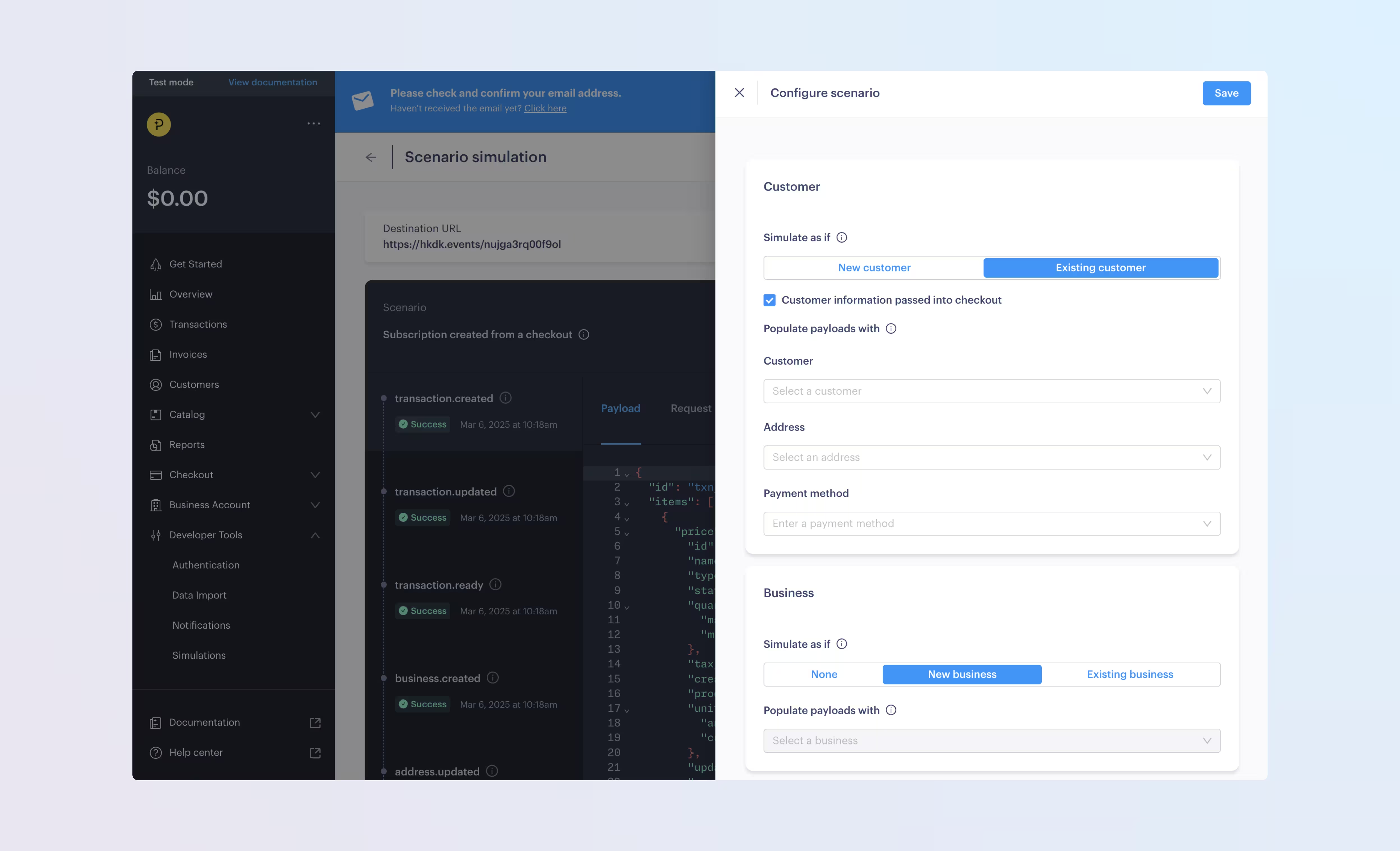
How it works
You can use webhook simulator to send test webhooks for single events or predefined scenarios as part of testing and integration.
Previously, scenarios played a predefined set of events. Now, you can configure your scenario webhook simulations with entities and options.
Every scenario can be configured with entities and options. Each scenario has its own set list of entities and options you can provide.
Entities
Use entities to populate simulated webhook payloads with your real data.
They map to your existing Paddle entities, such as customers and subscriptions.
Providing existing entities when configuring a scenario simulation populates the payloads of sent webhooks with the details of that entity, but doesn't determine what webhooks are sent in a flow.
/simulations { "notification_setting_id": "ntfset_01j82d983j814ypzx7m1fw2jpz", "name": "Create a subscription creation simulation with config", "type": "subscription_creation", "config": { "subscription_creation": { "entities": { "customer_id": "ctm_01grnn4zta5a1mf02jjze7y2ys", "address_id": "add_01gm302t81w94gyjpjpqypkzkf", "business_id": "biz_01grrebrzaee2qj2fqqhmcyzaj", "payment_method_id": "paymtd_01hkm9xwqpbbpr1ksmvg3sx3v1", "discount_id": "dsc_01gv5kpg05xp104ek2fmgjwttf", "items": [ { "price_id": "pri_01gsz8z1q1n00f12qt82y31smh", "quantity": 5 } ] } } }}Options
Options determine what flow should occur within specific scenarios, including which webhooks are sent and the details they contain.
These are related to what user actions were taken, or what fields are present on certain entities when the scenario takes place.
For example, you can specify whether a user failed a payment when renewing their subscription, and if that subscription should cancel or pause.
/simulations { "notification_setting_id": "ntfset_01j82d983j814ypzx7m1fw2jpz", "name": "Create a failed subscription renewal simulation with subscription ID", "type": "subscription_renewal", "config": { "subscription_renewal": { "entities": { "subscription_id": "sub_01h04vsc0qhwtsbsxh3422wjs4" }, "options": { "payment_outcome": "failed", "dunning_exhausted_action": "cancel" } } }}Next steps
This change is available in version 1 of the Paddle API, and in the Paddle dashboard.
It's a non-breaking change, meaning it doesn't impact existing integrations.
We recommend reading more on how to configure simulations, which entities and options are available for each scenario type, and which webhooks are sent based on which configuration options have been selected.
Summary of changes
| Entity | Field | Change | Type |
|---|---|---|---|
| Simulation | config | + Added | Field |
| Entities and options for configuring scenario simulations. | |||